
- Originally published April 2026. Updated on September 24, 2026
Cricut provided me with a Cricut Explore 5 and Essentials Bundle to try for this review. This review was written and tested by Justine Bicknell, of Child’s Life and all opinions and experiences shared here are my own.
If you’re thinking about getting your first Cricut machine—or wondering if it’s time to upgrade—the Cricut Explore 5 is likely one of the models on your radar. Released in March of 2026 alongside the updated Cricut Joy 2 machine, it’s the newest addition to Cricut’s mid-range lineup, built for everyday projects like vinyl decals, custom apparel, cards, and stickers.
But with several Explore versions already out there, the question is: what’s actually new here, and is it worth choosing over the previous models? As a Cricut Maker owner for several years, I was especially curious how it would compare. I’ve also been interested in trying matless cutting for a while now and I really like the streamlined look of the new machines, so when Cricut offered to send me the Explore 5 for testing I couldn’t resist.
Update – Since I originally tested the Explore 5, Cricut has expanded its machine lineup with the new Cricut Maker 5, announced in September 2026. Cricut has also just launched its new StickerPix line of dedicated sticker and photo machines. I hope to be taking a closer look at these newer additions separately.
What It Is
The Cricut Explore 5 is a full-size smart cutting machine that works with the Cricut Design Space app to cut, draw, and score materials for DIY and small business projects. It’s built for standard 12-inch materials and supports both mat-based and matless cutting using Smart Materials.
It’s positioned as a versatile, mid-range machine—ideal for hobbyists and small-scale makers who want more capability than entry-level models like the Joy.
Where the Explore 5 Sits in the Cricut Lineup
Cricut machines generally fall into three tiers:
Entry-level: Cricut Joy and Joy Xtra (compact, smaller projects)
Mid-range: Explore series (balanced features and price)
Advanced: Maker series (more tools, more materials, higher power)
The Explore machines can do more than the Joy machines but don’t have the expanded tool system or material range of the Maker machines, which can cut 300+ materials compared to roughly 100+ for Explore models.
Not sure which model is the right fit? Cricut has a handy cutting machine comparison chart where you can compare features, compatible materials and tools across its current lineup.
What Has Changed on the Machine
The biggest changes with the Cricut Explore 5 are physical and usability-focused rather than performance-based.
- Smaller, lighter design
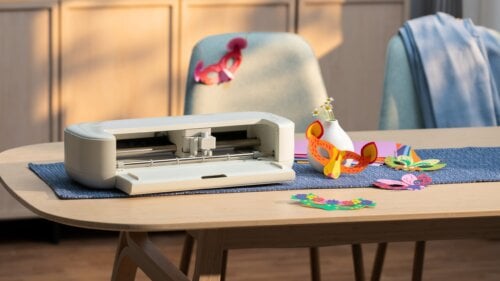
The machine has a more compact footprint, making it easier to fit into smaller workspaces or store when not in use. It’s also noticeably lighter to carry. - Cleaner, more streamlined look
Cricut has simplified the overall design, giving it a more modern, minimal feel compared to earlier Explore models. I personally prefer the streamlined look over my Cricut Maker, but it’s not something that would sway my purchase decision—and I do miss the small side compartment for tools. - New pen system (older pens may not work)
The Explore 5 uses an updated pen and marker system and older Cricut pens don’t fit the same way, so you may need to replace or adapt what you already have. - No power button (auto-on design)
The machine powers on as soon as it’s plugged in, with no dedicated on/off button. It will sit idle when not in use, but turning it fully off means unplugging it (or using a switched power bar). It’s a small change, but noticeable—and had me stumped for a while. - No full lid or protective cover
Unlike earlier Explore machines and the Cricut Maker, the Explore 5 has a more open design. Even when “closed,” there’s a large top opening, which could be a concern in spaces with dust, pet hair, or general debris. That said, after sitting in my office for three weeks—in a house with two long-haired dogs—I didn’t notice any significant dust build-up inside.
Overall, it feels like Cricut has leaned into making the machine easier to use and more accessible rather than adding any new capabilities. In terms of cutting capability and speed, it remains very similar to recent Explore models, which means existing users won’t see a major performance jump.

What Comes in the Box
The Cricut Explore 5 Essentials Bundle includes everything you need to get started:
- Cricut Explore 5 Machine (mine was in Taupe)
- Fine-Point Blade
- Scoring Tool
- Standard Grip Machine Mat
- Dual Sided Marker (Black)
- Materials (cardstock, Smart Vinyl™, Smart Iron-On™, printable vinyl, transfer tape)
- 2-Card Mat
- Portable Trimmer
- Basic tools (weeding tool, scraper, spatula)
You can compare all the available bundles for the Explore 5 on the Cricut website.
What Materials It Cuts
Like previous Explore machines, the Explore 5 cuts 100+ materials, covering most common crafting needs.
In comparison, the Cricut Maker series can cut 300+ materials, including fabric and thicker materials like leather and wood. This is due to the Maker’s more powerful cutting system and wider range of tools.
So for most everyday projects—like vinyl decals, heat transfer, cards, and stickers—the Explore 5 is The Explore 5 is more than capable. But if you want more versatility long-term, the Maker still has a clear advantage.
Most popular materials for Explore projects include:
- Adhesive vinyl (decals, labels)
- Iron-on / heat transfer vinyl (apparel)
- Cardstock and paper
- Sticker paper (including print-then-cut)
- Infusible Ink sheets
- Poster board and light specialty materials
It can also draw, score, and write using compatible tools, making it useful for cards, invitations, and layered paper projects.

First Impressions & Setup
Out of the box, the Cricut Explore 5 is quick to connect and get running. Bluetooth setup on both desktop and mobile was fast and straightforward.
That said, I did feel a bit lost at the start. Unlike my previous Cricut Maker, which came with a guided first project and clear step-by-step introduction, this machine doesn’t include the same kind of onboarding experience. I didn’t find an obvious “start here” project or clear direction on what to do first—just the machine and materials.

With my Cricut Maker, the included sample projects walked you through the basics—starting with a simple paper cut, followed by a small glitter vinyl project. It was a really effective way to learn the core steps, like loading a mat, cutting and applying a design, using the two materials most people start with.
Setting up the Explore 5 through Design Space was very quick and straightforward, though. Once you’re in Design Space, Cricut provides an online Getting Started Guide, which walks through setup and basic steps. . There are also plenty of projects to try, along with a “How to Make Cricut Projects” video that gives a short introduction to Design Space. You can also find more Cricut how-to videos on YouTube.
What I Tested
For this review, I first tested the Cricut Explore 5 with the materials included in the Essentials Bundle, trying a mix of Cricut’s built-in projects and my own designs. Some Design Space projects require a Cricut Access subscription, while others are free to use.
The bundle includes a good variety to get started:
- Value Cardstock
- Smart Vinyl™ (matless permanent vinyl)
- Smart Iron-On™ (matless heat transfer vinyl)
- Printable Vinyl
- Transfer Tape
- 2-Card Mat
- Custom cards and Cricut Access designs I have made with my Cricut.
My Cricut Maker doesn’t support matless cutting, so I was curious to try this feature. Since I mostly create paper projects—along with cards and silk screen templates—I wasn’t sure how useful it would be in my workflow.
I also tested the machine using my usual Cricut medium-weight cardstock to compare the results with what I’m used to seeing from my Maker. One thing I noticed is that the Explore 5 felt less “guided” during some projects. While creating layered paper cards, the machine didn’t warn me when the wrong tool was loaded, and I accidentally cut where a score line should have been. I’m so used to the way my Maker guides me through each step that this caught me off guard.

Is the Cricut Explore 5 Worth It?
The Cricut Explore 5 is a solid choice for anyone looking for a versatile cutting machine for everyday crafting. It handles the projects most people are likely to make—vinyl decals, iron-on designs, cards, stickers and paper crafts—without the higher price or expanded tool system of the Maker series.
I especially like the updated, sleek and simple design. It looks clean and modern on a desk or countertop and takes up less visual space than my older Maker. Matless cutting with Smart Materials is also a nice addition, particularly for quick vinyl and iron-on projects where you don’t want to pull out a cutting mat.
For someone buying their first Cricut, I think the Explore 5 hits a nice middle ground. It offers considerably more flexibility than the smaller Joy machines without requiring you to move up to the more expensive Maker if you don’t expect to work with fabric, leather, wood or more specialized tools.
If you already own a recent Explore model, however, I don’t see a good reason to upgrade purely for performance. The improvements here are more about the machine’s size, design and overall usability than new cutting capabilities. And if you already own a Maker, moving to the Explore 5 would mean giving up some versatility in exchange for the smaller footprint and matless cutting.
There are a few things I’d change. I miss the storage compartment on my Maker, and I’m still not entirely sold on having no power button, although I have gotten used to it. I also would have liked to see a more guided first-project experience for beginners. But none of these were major issues once I started using the machine.
Overall, I’ve really enjoyed using the Cricut Explore 5. It’s compact, easy to use and can handle a huge range of everyday craft projects. It strikes a good balance between simplicity and versatility, with plenty of room to experiment and take on more ambitious projects as your skills grow.
Cricut, in general, does a great job of making machines that are easy to use and genuinely fun to create with, and the Explore 5 is no different. I’ve also had a good experience with Cricut customer support over the years: when my original Maker developed cutting issues about a year after I purchased it, Cricut replaced it under warranty, and that replacement is still going strong today.